DJI has released firmware version 01.02.07.06 for the DJI Osmo Pocket 4. Although this update does not introduce new features, it improves system stability and fixes several known issues. At the same time, DJI released DJI Mimo app version 2.10.9 for iOS and Android to ensure full compatibility with the latest firmware.
Unlike major feature updates, this release focuses on improving reliability and delivering a smoother user experience.
What’s New in the Latest Update
DJI only mentions “fixes for some known issues” in the official release notes. However, the company does not identify the exact bugs that the update resolves.
Based on community feedback and previous Pocket 4 firmware releases, DJI likely focused on the following areas:
- Bluetooth connection issues between the camera and the DJI Mimo app.
- Slow startup or repeated booting after the June 9 feature update.
- Minor autofocus stuttering while recording videos.
- Occasional crashes when users switch rapidly between shooting modes.
DJI has not officially confirmed these fixes. Instead, the company generally includes broad descriptions in maintenance updates and avoids listing every bug individually.
If the installation fails, restart both the Osmo Pocket 4 and the DJI Mimo app. Then enable Wi-Fi and Bluetooth, reconnect the camera, and try the installation again before contacting DJI Support.
Firmware Version History
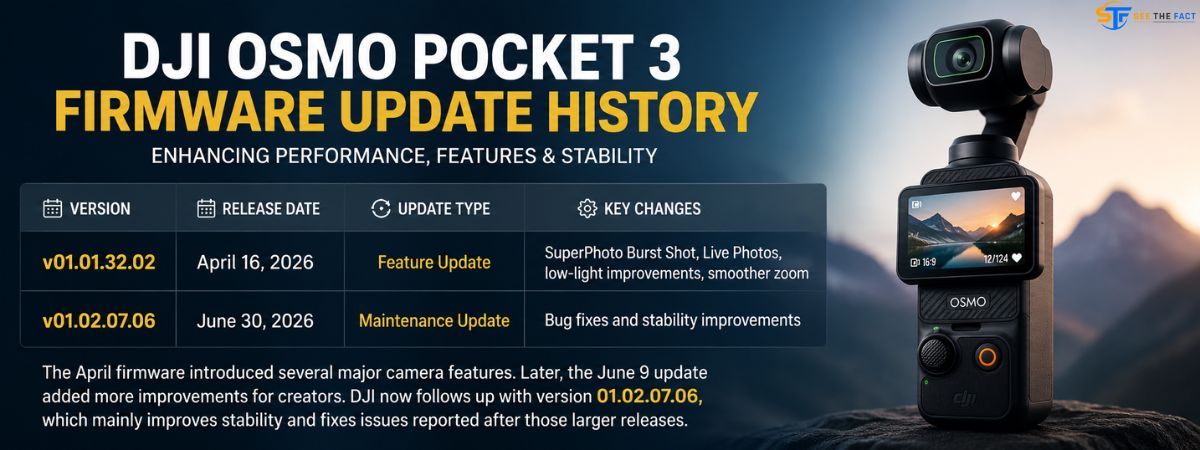
| Version | Release Date | Update Type | Key Changes |
|---|---|---|---|
| v01.01.32.02 | April 16, 2026 | Feature Update | SuperPhoto Burst Shot, Live Photos, low-light improvements, smoother zoom |
| v01.02.07.06 | June 30, 2026 | Maintenance Update | Bug fixes and stability improvements |
The April firmware introduced several major camera features. Later, the June 9 update added more improvements for creators. DJI now follows up with version 01.02.07.06, which mainly improves stability and fixes issues reported after those larger releases.
How to Install DJI Osmo Pocket 4 Firmware 01.02.07.06
The installation takes only a few minutes through the DJI Mimo app.
Before You Start
- Charge the Osmo Pocket 4 battery to at least 15%.
- Connect your phone to a stable Wi-Fi network.
- Turn on Bluetooth.
Installation Steps
- Open the DJI Mimo app on your Android or iPhone.
- Turn on your DJI Osmo Pocket 4.
- Connect the camera to the app using Bluetooth.
- The app automatically checks for new firmware and displays an update notification if your camera runs an older version.
- Tap Update and follow the on-screen instructions.
- Keep the camera powered on and leave the DJI Mimo app open until the installation finishes.
- The camera will restart automatically after completing the update.
If you do not receive the update notification, open Settings > Firmware inside the DJI Mimo app and check for updates manually.
If the Update Fails
- Restart the camera.
- Restart the DJI Mimo app.
- Enable Wi-Fi and Bluetooth again.
- Reconnect the camera.
- Try the update one more time.
- Contact DJI Support if the installation still fails.
Should You Install Firmware 01.02.07.06?
Yes. Most users should install this update.
DJI designed this maintenance release to improve stability and fix bugs that users reported after earlier firmware updates. Although it does not add new shooting modes or camera features, it can improve overall reliability.
If you have noticed Bluetooth dropouts, unexpected restarts, autofocus issues, or occasional app instability, installing this update is highly recommended.
The update is small, installs quickly, and costs nothing. For most DJI Osmo Pocket 4 owners, updating to firmware 01.02.07.06 is the best choice.
Sources: DroneDJ, DJI Official Release Notes, DJI Support.